Data mapping
Data mapping passes values from a Trigger or an earlier Step into the fields of a later Step. FastHook's picker shows the sources that are valid at the selected point in the Workflow graph.
Available data
- Trigger values use paths under
trigger. - Step outputs use paths under
steps.<step-id>. - The direct previous Step is preferred when the builder suggests a value.
- Other topological ancestors remain available.
- Parallel or downstream Steps are not available because they have not produced an output for this route.
Use the field picker
Open a mappable Action field and choose a source item, then a field. The builder displays provider labels and preview values, but stores the data path so each run resolves its own value.
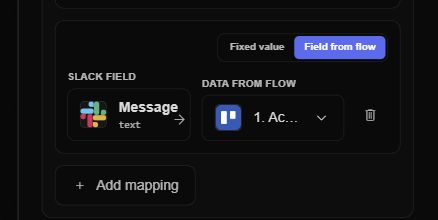
Switch a field from Fixed value to Field from flow, then choose the Trigger or an available earlier Step. The mapping row makes the destination field and its dynamic source visible together.
A direct field mapping may be represented as:
{{trigger.customer.email}}A later Step output may be represented as:
{{steps.lookup_customer.customer.id}}Step IDs in saved mappings are stable graph identifiers; use the picker instead of typing a label copied from the canvas.
Templates
Text fields can mix static text and dynamic tokens:
Order {{trigger.order.id}} was paid by {{trigger.customer.name}}When a value must remain JSON rather than becoming text, the builder uses a JSON-aware token form. This is especially important for arrays, objects, and spreadsheet matrix inputs.
Samples and real run data
Before the first run, the picker can use the Trigger or Action output schema sample. After execution, FastHook can use the latest available trigger and Step previews. Samples help configure the graph but do not guarantee every real event contains every optional field.
Missing values
Treat optional provider fields as optional in the receiving Action. If a field is required, add a Filter or Path before the Action so events without that value do not cause a provider failure.
Error-route data
Normal routes expose successful Step outputs. An error route exposes a normalized failure envelope with information such as the error code, message, Step identity, and attempt. Failure data does not leak into a normal success mapping.
Mapping checklist
- Select data only from the Trigger or an earlier Step on the same lineage.
- Use JSON-aware insertion for objects, arrays, and matrix cells.
- Test optional fields with more than one real event shape.
- Inspect the mapped input in Workflow Audit when an Action behaves unexpectedly.
- Put validation in a Filter or Path when the next Action has strict required fields.
Continue with Paths and conditions or inspect mappings in Runs and errors.